
02 / Yacht assignments
Yacht repair: assign survivors by the remaining gap
Read the forecast first. Verify completion at day-end.
Jump to an answer
Subtract the yellow forecast endpoint from the target, then compare that gap with the selected survivor’s contribution. In this Workshop example, 10 − 7 = 3, so the displayed +3 covers the gap. Confirm the assignment and check the day-end Yacht report; green +3 is a preview, not finished work.
PC build 2.0.1.2567. This guide explains the recorded assignment and its later result. It does not establish a guaranteed finishing day or ending.
Read the assignment: 7 forecast + 3 proposed = 10
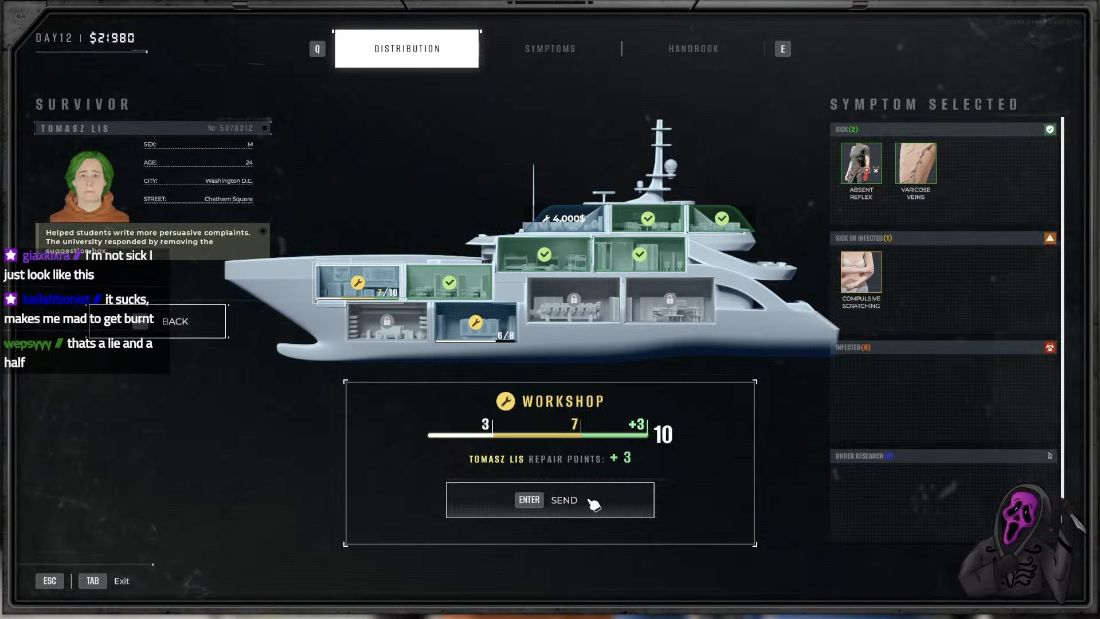
HOW TO READ THE NUMBERS
The selected survivor is Tomasz Lis, whose displayed contribution is +3 repair points. Use the contribution shown for your survivor; this example does not mean everyone contributes 3.
Check the result: Workshop 10/10
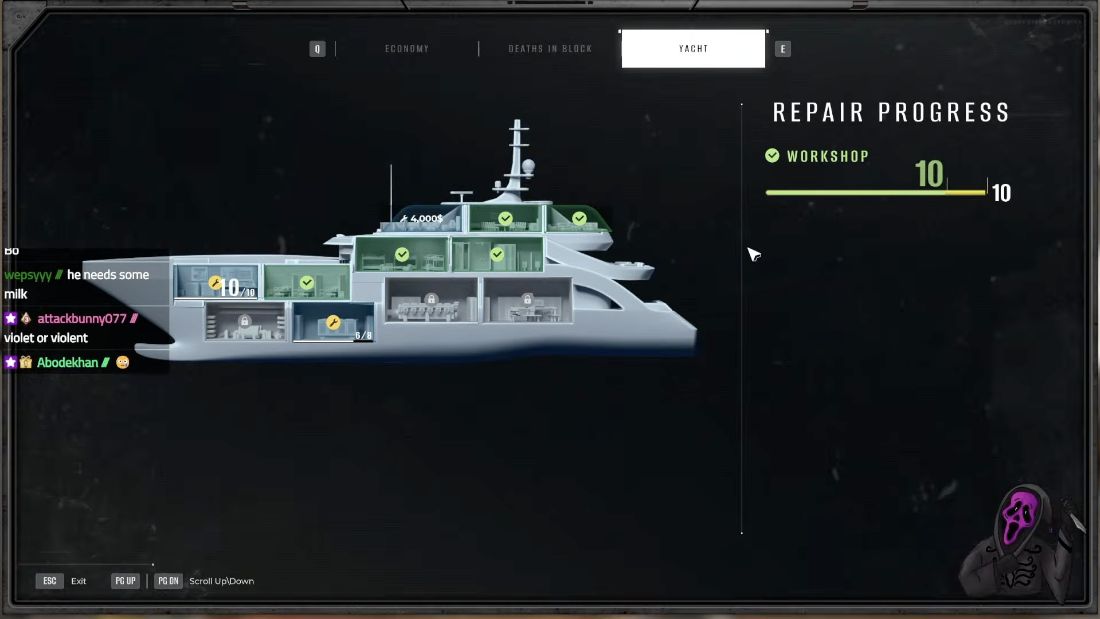
The later Day 12 Yacht report shows Workshop, a completion check, and 10/10. That is the completed result, distinct from the earlier green preview. The recording does not isolate every contribution between selection and the end of the day, so this is a worked example rather than a controlled test of all repair mechanics.
What to do with your next survivor
- Check the active task and room availability. If a compartment is blocked, read and resolve its requirement first.
- Read the yellow endpoint and the target. Subtract the endpoint from the target; do not add every printed number on the bar.
- Compare the selected survivor’s contribution with the gap. For this Workshop state, 10 − 7 leaves 3, matching the displayed +3.
- Confirm, then verify at day-end. Find the named room’s actual total and completion state in the Yacht report. Plan the next assignment from the updated state.
If the repair still fails
Do you need perfect inspections?
The reviewed evidence does not establish that rule. One player reports finishing despite mistakes, but that anecdote cannot tell you whether your save is recoverable.
A successful Workshop example also does not prove a minimum survivor count, overflow or reassignment rules, or a guaranteed Day 14/15 finish. Check your room totals and active tasks instead of treating this as a whole-run ending route.
Separate a repair failure from a report error. Patch 2.0.1.2567 fixed the yacht report listing living survivors as dead. That fix is not a promise of refunded repair points or a rescued ending.
Sources and review scope
Edited by jazfox. Gameplay by DieDevDie, streamed October 16, 2026. Game: Brigada Games / Devolver Digital. This is video-derived guidance, not our own playthrough.
- 2:04 — build 2.0.1.2567; 1:43:50–1:43:55 — Tomasz Lis and the Workshop selection preview; 2:04:37 — Day 12 Workshop result.
- Earlier footage: yellow-bar tutorial at 19:50 and a blocked room at 1:01:48. These separate recordings do not establish every rule for build 2.0.1.2567; the blocked-room recording's build is unknown.
- Player discussion of Day 14/15 failures; official 2.0.1.2567 patch notes.
Gameplay claims reviewed October 17, 2026. Use the values and active requirements in your game; later builds may differ.