
01 / X-ray inspection
Parasite Worms vs Infected Crawlers
Reference-card differences and one verified infected scan.
Jump to an answer
Match the named symptom and its category icon, then finish the rest of the inspection. In the X-RAY symptom reference, Parasite Worms have a green shield/check, Infected Crawlers a red biohazard, and Parasite Leeches a yellow warning triangle. The creature’s color alone does not tell you its category.
PC build 2.0.1.2567. The images below distinguish symptom reference entries from one verified live crawler case. An equivalent ordinary-worm live inspection remains unverified; a green symptom does not clear the whole survivor.
Compare the three named entries in the same build
Read the name and category icon together. The reference card’s yellow crawler belongs to the red infected category, while its red-orange worms have a green shield/check.
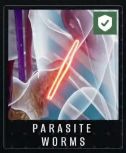
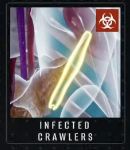
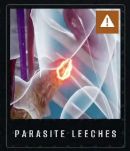
Reference cards in the X-RAY Symptoms menu, not live scans. Cropped from DieDevDie’s footage at 1:47:55. Open the full frame ↗
These entries are symptom reference cards, not three live scans. Use the shapes to compare candidates, then check the named category. If the image is ambiguous, inspect another view rather than relying on a fixed count or size rule. No guaranteed scanner setting is established here.
What an infected crawler looks like during an actual scan
This sequence follows Robert Pyle in the same recording. It connects what the scanner shows to a named selection and the game’s feedback.
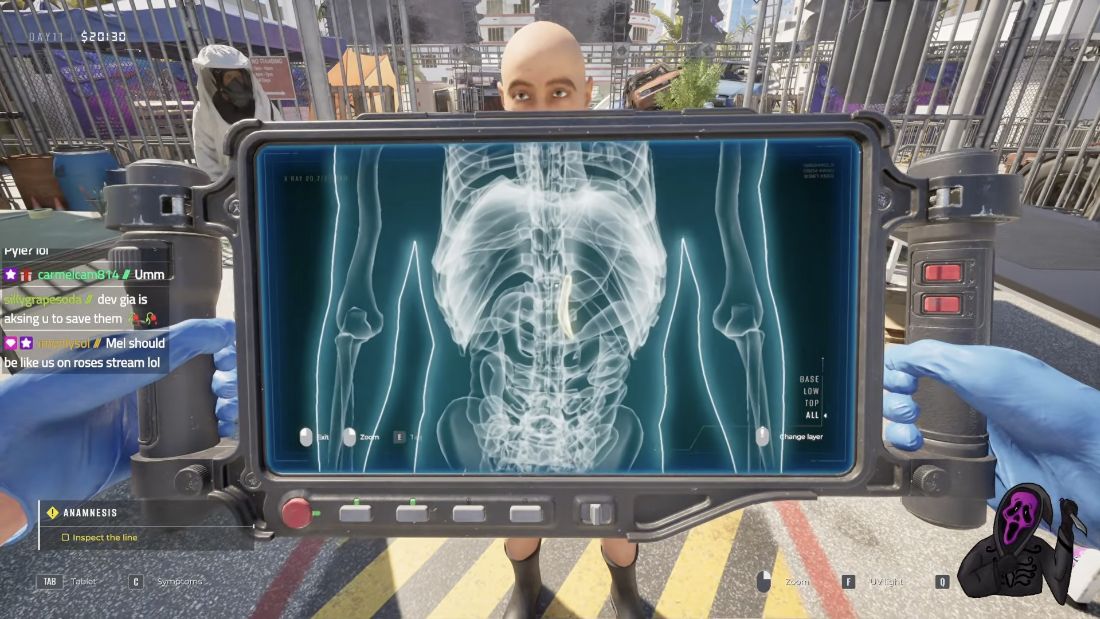


This is one confirmed example. It does not establish that crawlers always appear alone, at that location, or only on the ALL layer.
Avoid these inspection shortcuts
- “One means infected; two means safe” is not a verified rule. Counts and fixed size ratios from community replies are not enough to classify your next case.
- Parasite Worms and Parasite Leeches are different entries. Compare their named categories rather than treating all small creatures as interchangeable.
- A green Worms entry is not a whole-person clearance. Finish checking other symptoms before deciding where the survivor goes.
Sources and review scope
Edited by jazfox. Gameplay by DieDevDie, streamed October 16, 2026. Game: Brigada Games / Devolver Digital. This guide is based on video review, not our own playthrough.
- 2:04 — build 2.0.1.2567; 1:47:56 — named symptom reference entries.
- Robert Pyle: 1:14:57 — scan, 1:15:38 — selection, 1:15:43 — feedback.
- Original player question informed the topic; community counts are not treated as game rules.
Gameplay claims reviewed October 17, 2026. Ordinary Worms and Leeches still lack equivalent verified live sequences in this guide. Later builds may differ.